
When do I need to submit my tax return?
Working for yourself means working to HMRC’s calendar. Tell us the date you started and we’ll show you every date that follows: when to register, when your first tax return and payment are due, your payments on account, and when Making Tax Digital starts for you.
- Your Self Assessment dates, worked out from your start date
- Your Making Tax Digital dates, if you add your turnover
- Add them all to your phone’s calendar in one go
Ruby’s first two years
Started 1 June 2026-
1 June 2026Starts her mobile beauty business, in the 2026/27 tax year
-
5 April 2027Her first tax year ends, with a profit of £20,000
-
5 October 2027Registers with HMRC for Self Assessment
-
31 January 2028First tax return and payment, plus her first payment on account£2,897.70£965.90 on account
-
6 April 2028Her £24,000 turnover is over £20,000, so Making Tax Digital starts
-
31 July 2028Second payment on account£965.90
-
7 August 2028Her first quarterly update, then every three months
Check your dates
Enter the date you started working for yourself. Add your turnover too if you'd like to see when Making Tax Digital starts for you.
The dates every sole trader works to
The tax year runs from 6 April to 5 April. Everything else follows from that, and the same dates come round every year.
5 October: register with HMRC
In your first year, tell HMRC you’re self-employed by 5 October after the end of the tax year you started in. You’ll get a Unique Taxpayer Reference (UTR) in the post. How to register
31 October: paper tax returns
Only if you send your return on paper. Filing online gives you three more months, and it’s how almost everyone does it. Do I need to send a tax return?
30 December: if you’re employed too
File online by 30 December, owe less than £3,000 and already pay tax through PAYE, and HMRC can collect your bill through your tax code over the next year. Paying through your tax code
31 January: your tax return and tax
The big one. Your online tax return for the year that ended the previous April, and any tax you owe, including Class 4 National Insurance and your first payment on account. Filling in your tax return
31 July: second payment on account
If your bill is £1,000 or more, you usually pay towards next year’s tax in two halves, by 31 January and 31 July. It’s paying early, not paying more. Payments on account
7 August, November, February and May
Once you’re in Making Tax Digital, you send HMRC a quarterly update by the 7th of the month after each quarter ends, then your tax return by 31 January as usual. How MTD updates work in Pulse
When Making Tax Digital starts for you
Making Tax Digital for Income Tax means keeping your records digitally and sending HMRC a short update every three months, then a final declaration after the tax year ends. Whether you're in depends on your turnover, the total you charge your customers before any expenses, not your profit.
- From 6 April 2026Over £50,000Already started
- From 6 April 2027Over £30,000Based on your 2025/26 tax return
- From 6 April 2028Over £20,000Based on your 2026/27 tax return
An example. Ruby’s mobile beauty business takes £24,000 in 2026/27, and her profit after costs is £20,000. It’s her turnover that counts, not her profit, and £24,000 is over £20,000. So when her 2026/27 tax return shows that, she’ll need to use Making Tax Digital from 6 April 2028.
The quarterly updates are due by 7 August, 7 November, 7 February and 7 May. If you have other self-employed work or rent out a property, that income counts towards the total too. When do I need to start?
What happens if you’re late
HMRC charges a £100 penalty the day after the 31 January deadline, even if you have no tax to pay, and it goes up the longer the return is late. Paying late adds interest and its own penalties on top.
If you can’t pay everything you owe, don’t wait. Send your return on time anyway, then talk to HMRC about a payment plan. If you can’t pay your tax bill
Once you’re in Making Tax Digital, late updates and late returns work on a points system instead. Penalties for Making Tax Digital on gov.uk
| How late | Penalty |
|---|---|
| Return 1 day late | £100 |
| Return 3 months late | £10 a day, up to £900 |
| Return 6 months late | 5% of the tax due, or £300 |
| Return 12 months late | Another 5%, or £300 |
| Tax paid 30 days late | 5% of what’s unpaid |
| Tax paid 6 and 12 months late | Another 5% each time |
Where it says “or £300”, it’s whichever is higher. Interest is charged on late tax as well. Source: gov.uk Self Assessment penalties.
How Pulse gets you ready for every deadline
Most of the stress around 31 January comes from leaving everything until January. Pulse is our online bookkeeping system, with apps for iPhone and Android, so your figures build up as you go.
Income and expenses as you go
Add what you earn and spend on your phone or computer, a minute at a time. When the deadline comes round, your year is already in.
Receipts saved, not lost
Take a photo of a receipt in the app and it’s saved against the expense, ready if HMRC ever asks. No shoebox in January.
Receipt scannerMileage worked out for you
Enter postcodes or use your location, and Pulse works out the miles and the 55p a mile you can claim for the first 10,000 business miles.
Logging mileageRecurring costs on autopilot
Set up the bills that come every month, like your phone or insurance, and Pulse asks you to confirm each one when it’s due.
MTD updates sent for you
Pulse is recognised by HMRC and sends your quarterly updates straight to HMRC. Switch on Auto MTD and Pulse emails you your figures first, then sends each update on the 1st of the month it’s due.
Auto MTDYour tax return, sent
On packages that include it, Pulse can submit your tax return to HMRC, built from the figures you’ve added through the year.
Compare packages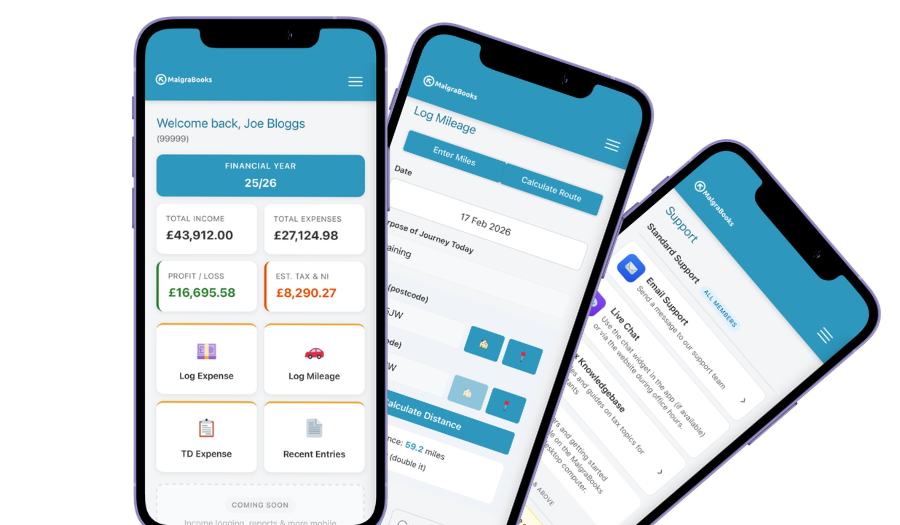
Access your accounts on your mobile
Designed for iPhone and Android phones, so you can add a payment, log a journey or scan a receipt between jobs, and check your reports and tax as you go.
See the mobile appEvery deadline covered, in one package
Small Business Complete includes everything on this page. There are no invoice limits, and you can start partway through the year and add the months you've missed.
MalgraBooks is recognised by HMRC for Making Tax Digital. HMRC reference D5P1NR.
Small Business Complete
- Bookkeeping, invoicing and mileage in Pulse
- Unlimited receipt scanning
- Making Tax Digital quarterly updates
- Your tax return sent to HMRC
Questions about tax return deadlines
I started partway through the year. Which tax return do I do first?
The one for the tax year you started in. Tax years run from 6 April to 5 April, so if you started on 1 June 2026, your first return is for 2026/27. It covers 1 June 2026 to 5 April 2027 and is due online by 31 January 2028.
Do I need to register if I only earn a little?
Not if your self-employed income in a tax year is £1,000 or less before expenses, and you don’t need a tax return for another reason. That’s the trading allowance. The Budget on 28 October 2026 said it will rise to £3,000 from 6 April 2027, subject to legislation. Do I need to send a tax return?
I missed the 5 October deadline to register. What now?
Register as soon as you can. You won’t usually get a penalty for registering late, as long as you send your return and pay your tax on time. If you register after 5 October, HMRC will tell you your return deadline in its letter, which is 3 months from the date of the letter, but any tax is still due by 31 January. How to register with HMRC
I have a job as well. Does that change my dates?
No, the dates are the same. Your wages go on the same tax return as your business. If you file online by 30 December and owe less than £3,000, HMRC can collect it through your tax code instead of you paying it all on 31 January.
Does Making Tax Digital replace my tax return?
No. You send four quarterly updates through the year, then a tax return by 31 January as usual, from your MTD software. The updates mean most of the work is already done by then.
Why is my first January bill so much bigger?
If your bill is £1,000 or more, you’ll usually make your first payment on account at the same time, which is half of your bill again, towards next year. It’s only the first year that has the jump. After that, each January covers what’s left of last year’s bill plus half of next year’s. Payments on account
How long do I need to keep my records?
At least five years after the 31 January deadline for that tax year. For 2026/27, that’s until the end of January 2033. Receipt photos in Pulse count, so you don’t need to keep the paper copies. Keeping records
Can Pulse send my tax return to HMRC?
Yes, Pulse can submit your tax return to HMRC on packages that include it. Your figures come from what you’ve added through the year, so there’s no starting from scratch in January. See what’s in each package
Got a question that isn't here? Send us a message and the team will get back to you.