
Bookkeeping and Making Tax Digital (MTD) for CIS subcontractors
You’re on site all day, buying materials on the way in and getting paid by contractors who take CIS off before the money reaches you. Pulse keeps it all in one place, from your invoices and the CIS taken off them to the miles between sites and your Making Tax Digital updates.
- Invoice contractors with the CIS deduction taken into account
- Record the CIS taken off each payment as it comes in
- Send your Making Tax Digital updates straight to HMRC
Kev’s Wednesday
Plasterer, CIS at 20%-
Leaves home7:00am
-
Builders’ merchant, Trafford ParkBuys £60 of plaster and beads, receipt scanned4.0 miles from home
-
Kitchen extension, Ashton RoadFor Northfield Builders. £300 labour plus £60 plaster. £60 CIS taken off the labour, so £300 paid£3606.5 miles
-
Bathroom ceiling, Park LaneFor Hartley Homes. £150 labour, their materials. £30 CIS taken off, so £120 paid£1503.5 miles
-
Back home4:30pm5.0 miles
When Making Tax Digital starts for you
Making Tax Digital for Income Tax means keeping your records digitally and sending HMRC a short update every three months, then a final declaration after the tax year ends. Whether you're in depends on your turnover, the total you charge your customers before any expenses, not your profit.
- From 6 April 2026Over £50,000Already started
- From 6 April 2027Over £30,000Based on your 2025/26 tax return
- From 6 April 2028Over £20,000Based on your 2026/27 tax return
An example. You charge £700 a week for labour and work 45 weeks a year, which is £31,500. You also charge contractors £3,500 for materials you’ve bought. Your turnover is what you charge before deductions, so that’s £35,000, even though only £28,700 reaches your bank after £6,300 of CIS. If your 2025/26 tax return shows that, you’ll need to use Making Tax Digital from 6 April 2027.
The quarterly updates are due by 7 August, 7 November, 7 February and 7 May. If you have other self-employed work or rent out a property, that income counts towards the total too. When do I need to start?
Getting your CIS deductions back
This is the part subcontractors most often lose track of. When a contractor pays you, they take 20% off the labour part of your invoice, or 30% if you’re not registered for CIS, and pass it to HMRC. They don’t take it off materials you’ve paid for yourself, or off VAT.
That money isn’t lost. It counts as an advance payment towards your tax and National Insurance. On your Self Assessment tax return you put your full pay before deductions as income, and the total CIS taken off as your CIS deductions. HMRC works out what you owe and takes off what’s already been paid.
Because the 20% comes off before any of your expenses are counted, a lot of subcontractors have paid more than they owe by the end of the year. That’s why so many get a refund. In a simple case, if contractors took £5,000 off over the year and your tax and National Insurance comes to £4,000, HMRC pays you back £1,000. Every genuine cost you record lowers your profit, so it all counts.
Keep the monthly payment and deduction statement from each contractor. They should give you one within 14 days of the end of each tax month. You’ll need them for your tax return, and HMRC can ask to see them.
Driving to sites. If you work from home and move from one temporary site to the next, travel from home to site, between sites and to the merchant is usually business travel. If you’re on one site day after day for a long time, for example a big project that runs for months or years, that travel can start to look like ordinary commuting, so ask us before you claim it.
Read more about allowable expenses, cars, vans and mileage and tax return deadlines.
| On the invoice | Amount |
|---|---|
| Labour | £1,000 |
| Materials you bought | £200 |
| Invoice total | £1,200 |
| CIS deducted, 20% of the labour | £200 |
| Paid to you | £1,000 |
Your income for this job is the full £1,200. The £200 of CIS goes on your tax return as tax already paid, and the £200 of materials is your expense.
| Your status | Deducted |
|---|---|
| Registered for CIS | 20% |
| Not registered | 30% |
| Gross payment status | Nothing |
What you can claim as a CIS subcontractor
Every allowable expense brings down the profit you pay tax and National Insurance on, which can mean a bigger CIS refund. These are the ones subcontractors claim most. Keep the receipt for each, or scan it into Pulse.
Tools
Hand tools, power tools, blades, bits and repairs. Bigger items may need to go in as a capital allowance.
PPE and workwear
Safety boots, hard hat, hi-vis, gloves, goggles and dust masks. Everyday clothes don’t count. Clothing expenses
Van and mileage
55p a mile for the first 10,000 business miles, then 25p. That covers fuel, insurance and servicing. Cars, vans and mileage
CSCS card and training
Your CSCS card, plus courses that keep your skills up to date for the trade you already do. Training costs
Insurance
Public liability insurance, and cover for the tools you carry in the van.
Phone
The business share of your mobile, which you use to sort out jobs with contractors. Phone and broadband
Materials for jobs
Plaster, timber, cable and fixings you buy and charge the contractor for. What they pay you for them is part of your income.
Skips and tip fees
Skip hire and tip fees for waste from your jobs, when you’re the one paying for them.
What you can’t claim
- The CIS deductions themselves. They’re tax already paid, so they come off your tax bill instead
- Fuel and running costs for your van if you claim mileage for it
- Everyday clothes, even old ones you keep just for site
- Materials the contractor supplies
- Parking and speeding fines
For the full list, see Allowable expenses, what are they?
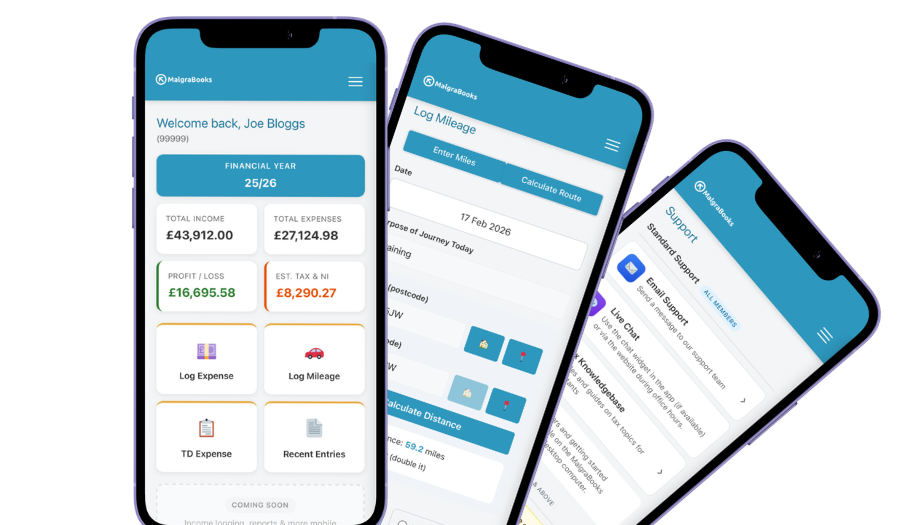
Access your accounts on your mobile
Designed for iPhone and Android phones, so you can add a payment, log a journey or scan a receipt between jobs, and check your reports and tax as you go.
See the mobile appHow Pulse helps
Pulse is our online bookkeeping system, with apps for iPhone and Android. Here’s what subcontractors use most.
Invoices that handle CIS
Set up your invoice and CIS settings once, and your invoices to contractors take the CIS deduction into account.
Creating an invoiceRecord the CIS taken off
When a contractor pays, mark the invoice as paid and enter the CIS they deducted. The payment goes into your income with the deduction recorded alongside it.
Marking an invoice as paidMileage on your phone
Enter postcodes or use your location, and Pulse works out the miles. Save your sites and your usual merchant in your address book so each journey takes seconds.
Logging mileageScan your receipts
Take a photo of a merchant receipt in the app and it’s saved against the expense. Handy if a contractor asks for proof of what you paid for materials.
Receipt scannerRegular costs remembered
Your public liability insurance and phone bill come round every month. Add them as recurring expenses and Pulse asks you to confirm each one when it’s due.
Recurring expensesStraight to HMRC
Pulse is recognised by HMRC for Making Tax Digital, so your quarterly updates go straight from Pulse to HMRC.
Sending MTD updatesBookkeeping and Making Tax Digital in one package
There are no invoice limits, and you can start partway through the year and add the months you've missed.
MalgraBooks is recognised by HMRC for Making Tax Digital. HMRC reference D5P1NR.
Small Business + MTD
- Bookkeeping, invoicing and mileage in Pulse
- 25 receipt scans a month
- Making Tax Digital quarterly updates
Questions subcontractors ask us
Do I need to register for CIS?
You should if you work for a contractor. If you don’t, they’ll take 30% off your labour instead of 20%. If you’re new and don’t have a Unique Taxpayer Reference yet, you can choose the subcontractor option when you register as a new business for Self Assessment, and you’ll be registered for both at the same time. How to register with HMRC
How do I get my CIS refund?
Through your Self Assessment tax return. You put in your full pay before deductions and the total CIS taken off, and HMRC works out the difference. If you’ve paid too much, they pay it back. You can send your return from 6 April, as soon as the tax year ends, so there’s no need to wait until January. Tax return deadlines
Do I record what I invoiced or what I was paid?
What you invoiced. Your income is the full amount before CIS, and the CIS deducted is recorded separately as tax already paid. It’s the full amount that counts towards the Making Tax Digital thresholds too, so check it rather than going by what reached your bank.
A contractor hasn’t given me my statements. What should I do?
Ask them. Contractors must give you a payment and deduction statement within 14 days of the end of each tax month. If you still can’t get them, HMRC says you can write to them with the details of the payments and deductions instead.
I buy materials and put them on my invoice. How does that work?
Show labour and materials separately on your invoice. CIS is only taken off the labour, not materials you’ve paid for yourself. The contractor may ask for proof of what you paid, so keep the receipt. The whole invoice is your income and the materials are your expense.
Do I need to register for VAT?
Only if your turnover goes over £90,000 in any rolling 12 months. Remember that’s your turnover before CIS is taken off. If you are VAT registered, CIS isn’t taken off the VAT on your invoices. VAT explained
Got a question that isn't here? Send us a message and the team will get back to you.