
Bookkeeping and Making Tax Digital (MTD) for self-employed handymen
A flat-pack wardrobe in the morning, a dripping tap after lunch and a blocked gutter on the way home. As a handyman or handywoman, you might fit four small jobs into a day, get paid four different ways and pick up materials in between. Pulse keeps it all in one place, from the invoice you send before you leave to your Making Tax Digital updates.
- Invoice from your phone before you pack up
- Log the miles between jobs as you go
- Send your quarterly updates and tax return straight to HMRC
Lorna’s Wednesday
£30 an hour-
Leaves home8:00am
-
Mr and Mrs Hughes, Elm GroveFlat-pack wardrobe, 2 hours, paid in cash£602.4 miles from home
-
Trade counter, Station RoadPaid £18 for brackets, plugs and screws, receipt scanned1.6 miles
-
Mrs Doyle, KingswayThree shelves put up, £50 fixed price plus £18 materials, paid by card£681.8 miles
-
Mr Ahmed, Oak AvenueGutters cleared, fixed price, paid online before she left£401.0 miles
-
Rental flat, Park TerraceDripping tap and a sticking door, 1½ hours, on the letting agent’s monthly invoice£453.2 miles
-
Back home4:30pm4.0 miles
When Making Tax Digital starts for you
Making Tax Digital for Income Tax means keeping your records digitally and sending HMRC a short update every three months, then a final declaration after the tax year ends. Whether you're in depends on your turnover, the total you charge your customers before any expenses, not your profit.
- From 6 April 2026Over £50,000Already started
- From 6 April 2027Over £30,000Based on your 2025/26 tax return
- From 6 April 2028Over £20,000Based on your 2026/27 tax return
An example. You work in a warehouse during the week and do odd jobs at weekends, billing £450 a weekend for 48 weekends a year. That’s £21,600 of turnover. Your warehouse wages don’t count towards it. It’s over £20,000, so if your 2026/27 tax return shows that, you’ll need to use Making Tax Digital from 6 April 2028.
The quarterly updates are due by 7 August, 7 November, 7 February and 7 May. If you have other self-employed work or rent out a property, that income counts towards the total too. When do I need to start?
Starting out on the side
Plenty of handymen start with a few weekend jobs for friends and neighbours while they still have a job. You can be employed and self-employed at the same time, and this is where most of the questions we get from handymen come from.
The first £1,000. If your odd-job income is £1,000 or less in a tax year, before any costs, you usually don’t need to tell HMRC. This is the trading allowance. It covers all your self-employed work added together, not each kind of job separately.
Over £1,000. Once you go over, you need to register for Self Assessment by 5 October after the end of the tax year you started. If your first paid job was in May 2026, that’s by 5 October 2027. You can then take off either the £1,000 allowance or your actual costs, not both. Handymen buy a lot of materials, so actual costs often work out better.
Turnover, not profit. Making Tax Digital looks at what you bill before any costs. Materials you pick up and add to the bill count, even though you’ve spent the money. Your wages from your job don’t count at all.
Everyone’s mix of job and odd jobs is a bit different, so if you’re not sure where you stand, ask us.
Read more about how to register with HMRC and when you need to start Making Tax Digital. Working for a building firm under the Construction Industry Scheme instead? See our page for CIS subcontractors.
| Weekend jobs | Amount |
|---|---|
| Billed to customers (turnover) | £21,600 |
| Materials bought for jobs | £5,000 |
| Tools, insurance and mileage | £1,600 |
| Profit | £15,000 |
Making Tax Digital looks at the £21,600, not the £15,000.
| Turnover in a tax year | What it means |
|---|---|
| £1,000 or less | Usually nothing to tell HMRC |
| Over £1,000 | Register by 5 October after the tax year |
| Over £20,000 | Making Tax Digital from 6 April 2028 |
| Over £30,000 | Making Tax Digital from 6 April 2027 |
The April 2027 date is based on your 2025/26 tax return and the April 2028 date on your 2026/27 return. If you also have rental income, that’s added to your turnover for Making Tax Digital.
What you can claim as a handyman
Every allowable expense brings down the profit you pay tax and National Insurance on. These are the ones handymen and handywomen claim most. Keep the receipt for each, or scan it into Pulse.
Materials for jobs
Screws, plugs, brackets, filler, sealant, paint and parts you pick up on the way. What you charge the customer for them is part of your income.
Tools
Drills, saws, ladders, spirit levels, dust sheets and drill bits. Bigger items may need to go in as a capital allowance.
Van or car
A flat rate for each business mile, or the actual running costs plus capital allowances. Pick one for each vehicle and stick with it. Cars, vans and mileage
Insurance
Public liability insurance, and cover for the tools you keep in the van or car.
Protective clothing
Safety boots, knee pads, gloves, dust masks and safety glasses. Everyday clothes don’t count. Clothing expenses
Phone and adverts
The business share of your mobile, plus leaflets, a local Facebook ad or a listing on a trades website. Marketing costs
Card machine fees
Fees charged by SumUp, Square and similar when a customer pays by card. Card payment charges
Admin at home
If you spend 25 hours or more a month on quotes, invoices and admin at home, you can claim a flat rate of £10 to £26 a month. Simplified expenses
What you can’t claim
- Fuel for your van or car if you claim mileage for it
- Materials a customer or letting agent buys for you to fit
- Tools and materials for jobs on your own home
- Everyday clothes, even old ones you keep just for work
- Parking and speeding fines
- Your actual costs, if you’ve taken off the £1,000 trading allowance instead
For the full list, see Allowable expenses, what are they?
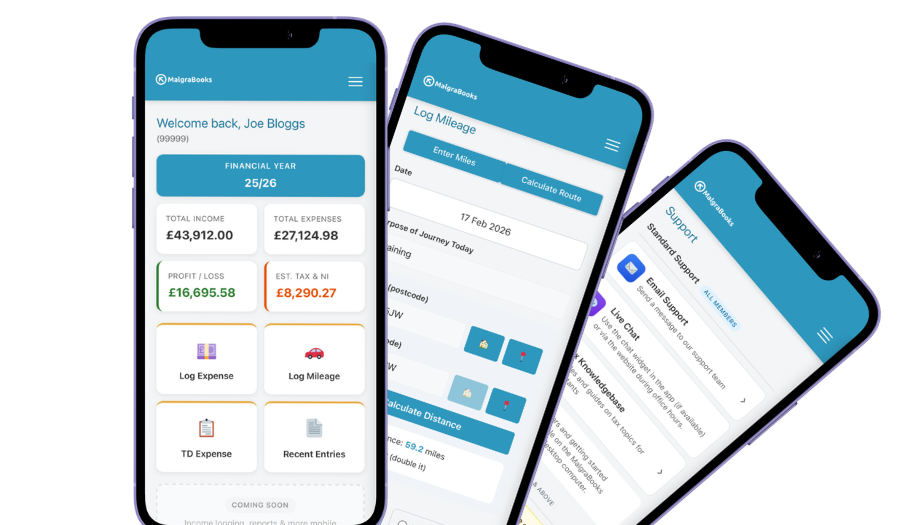
Access your accounts on your mobile
Designed for iPhone and Android phones, so you can add a payment, log a journey or scan a receipt between jobs, and check your reports and tax as you go.
See the mobile appHow Pulse helps
Pulse is our online bookkeeping system, with apps for iPhone and Android. Here’s what handymen use most.
Invoice on the doorstep
Put the invoice together on your phone while you pack the tools away. Add your time and any materials, and send it before you get back in the van.
Creating an invoicePaid on the spot
Add your Stripe, SumUp or PayPal.Me link and a Pay online button appears on your invoices, so the customer can pay before you leave. The money goes straight to you, and part payments are tracked.
Online paymentsRegular work for agents
If a letting agent or landlord sends you work every month, set up a recurring invoice. Pulse can send it automatically or save it as a draft so you can check it first.
Recurring invoicesScan your receipts
Take a photo of the receipt at the trade counter and it’s saved against the expense, so the receipts don’t end up crumpled in the door pocket.
Receipt scannerMileage between jobs
Enter postcodes or use your location, and Pulse works out the miles. Save regular customers, the agent’s flats and your trade counter in the Address Book so each journey takes seconds.
Address BookStraight to HMRC
Pulse is recognised by HMRC for Making Tax Digital. Send your quarterly updates from Pulse, and your tax return if you choose that package.
Sending MTD updatesEverything in one package
Small Business Complete includes everything on this page. There are no invoice limits, and you can start partway through the year and add the months you've missed.
MalgraBooks is recognised by HMRC for Making Tax Digital. HMRC reference D5P1NR.
Small Business Complete
- Bookkeeping, invoicing and mileage in Pulse
- Unlimited receipt scanning
- Making Tax Digital quarterly updates
- Your tax return sent to HMRC
Questions handymen ask us
I only do odd jobs at weekends. Do I need to register?
If your odd-job income is more than £1,000 in a tax year before any costs, yes, even if you have a job as well. You need to register by 5 October after the end of the tax year you started in. For example, if you started in June 2026, that’s by 5 October 2027. How to register with HMRC
Will my wages from my job count towards Making Tax Digital?
No. Only your self-employed turnover and any rental income count. Your wages still count when your tax bill is worked out, but they don’t decide whether you need to use Making Tax Digital.
I buy materials and add them to the bill. How do I record that?
The whole invoice is your income, and the materials are your expense. If the customer or the letting agent buys the materials and you just fit them, there’s nothing to record except your own charge.
A lot of my customers pay cash. Do I need to record it?
Yes, every payment counts as income however it’s paid. The easiest habit is to add it in the app before you drive to the next job.
Should I claim mileage or my van’s actual costs?
Either can work. Mileage is a flat 55p a mile for the first 10,000 business miles and 25p after that. Actual costs means the business share of fuel, insurance and repairs, plus capital allowances on the van itself. Once you’ve chosen a method for a vehicle you can’t switch, so ask us which suits you before you start. Cars, vans and mileage
Do I need to register for VAT?
Only if your turnover goes over £90,000 in any rolling 12 months. Most self-employed handymen are well under this. VAT explained
Got a question that isn't here? Send us a message and the team will get back to you.