
Bookkeeping and Making Tax Digital (MTD) for self-employed Oriflame Brand Partners
You place your order, drop off bags on doorsteps, take cash from one customer and a bank transfer from the next, and then your bonus lands from Oriflame. Some of what you order is for customers and some is for you. Pulse helps you keep the business side straight, from the money customers pay you to your Making Tax Digital updates.
- Record customer payments and bonuses as they come in
- Log your delivery runs on your phone
- Send your quarterly updates and tax return straight to HMRC
Natalie’s Thursday
Delivering orders-
Leaves home9:30am, with this campaign’s orders bagged up
-
Mrs Fletcher, Hawthorn CloseSkincare order, paid in cash on the doorstep£321.5 miles from home
-
Bakery staff room, Market StreetTwo orders for the team, paid by bank transfer£452.3 miles
-
Mrs Gardner, Linden RoadMake-up order and a free sample, paid online from the invoice£281.7 miles
-
Back home12:30pm2.5 miles
When Making Tax Digital starts for you
Making Tax Digital for Income Tax means keeping your records digitally and sending HMRC a short update every three months, then a final declaration after the tax year ends. Whether you're in depends on your turnover, the total you charge your customers before any expenses, not your profit.
- From 6 April 2026Over £50,000Already started
- From 6 April 2027Over £30,000Based on your 2025/26 tax return
- From 6 April 2028Over £20,000Based on your 2026/27 tax return
An example. You sell Oriflame alongside a mobile nail business. Your customers pay you £5,000 over the year and your bonuses add up to £1,000, so that’s £6,000 from Oriflame. Your nail clients pay you £16,000. Together that’s £22,000 of self-employed turnover, before you take off anything you spent. It’s over £20,000, so if your 2026/27 tax return shows that, you’ll need to use Making Tax Digital from 6 April 2028.
The quarterly updates are due by 7 August, 7 November, 7 February and 7 May. If you have other self-employed work or rent out a property, that income counts towards the total too. When do I need to start?
Discounts, bonuses and products for yourself
This is the part Brand Partners most often get wrong. Lots of people join partly for their own make-up and skincare, then start selling to friends, family and people at work. One order ends up holding both, and it’s easy to put the whole lot through the books.
What counts as income. Every payment from a customer, however they pay, and every bonus or cash award the company pays you. A bonus is still income even if it was worked out on products you bought for yourself.
Products for you and your family. These aren’t a business expense, so leave them out of your expenses or take them back out of the order. A cheaper price on your own order isn’t income either. It’s simply a lower price, so there’s nothing to record.
Samples, testers and demo products. Samples you give away and products you open for customers to try at a party or a stall are business costs. If a demo product ends up in your own bathroom cabinet, it’s personal.
Stock at the end of the tax year. Most sole traders now use the cash basis, the standard way of working for HMRC. On the cash basis you claim products when you pay for them, so you don’t need to count what’s left on the shelf on 5 April. If you use traditional accounting instead, unsold stock is counted at the year end and goods you take for yourself are added back at their normal selling price, so ask us before you work it out.
Read more about stock and goods for resale and allowable expenses.
| Item | In your books |
|---|---|
| Money customers pay you | Income |
| Bonuses and cash awards | Income |
| Products you buy to sell on | Expense |
| Samples and testers you give away | Expense |
| Products for you and your family | Not an expense |
| A discount on your own order | Nothing to record |
A simple habit helps. When an order arrives, split it straight away into customers’ bags and your own, and only put the customers’ share and any samples through Pulse.
What you can claim as an Oriflame Brand Partner
Every allowable expense brings down the profit you pay tax and National Insurance on. These are the ones Brand Partners claim most. Keep the receipt or order confirmation for each, or scan it into Pulse.
Products you sell
What you pay for products that go to customers. Keep your order confirmations so you can see which items were for customers and which were yours. Stock and goods for resale
Samples and testers
Samples you hand out with orders and testers you use at parties, stalls and events.
Fees and starter kit
Any annual fee you pay the company to stay registered, and a starter kit if you bought one.
Bags, packaging and postage
Gift bags, tissue paper, labels and the cost of posting orders to customers who live further away.
Delivery mileage
55p a mile for the first 10,000 business miles in a car, for delivery runs and trips to parties or events. Cars, vans and mileage
Phone and broadband
The business share of your mobile and internet, which you use for messages, orders and social media. Phone and broadband
Advertising
Paid social media posts, a design app subscription for your graphics, or a table at a local craft fair. Marketing costs
Admin at home
If you spend 25 hours or more a month on orders, messages and admin at home, you can claim a flat rate of £10 to £26 a month. Simplified expenses
What you can’t claim
- Products for yourself or your family, even if you bought them at a discount
- Demo products you end up using yourself
- Clothes, hair and make-up for looking nice when you meet customers
- Fuel for your car if you claim mileage for it
- Parking fines
For the full list, see Allowable expenses, what are they?
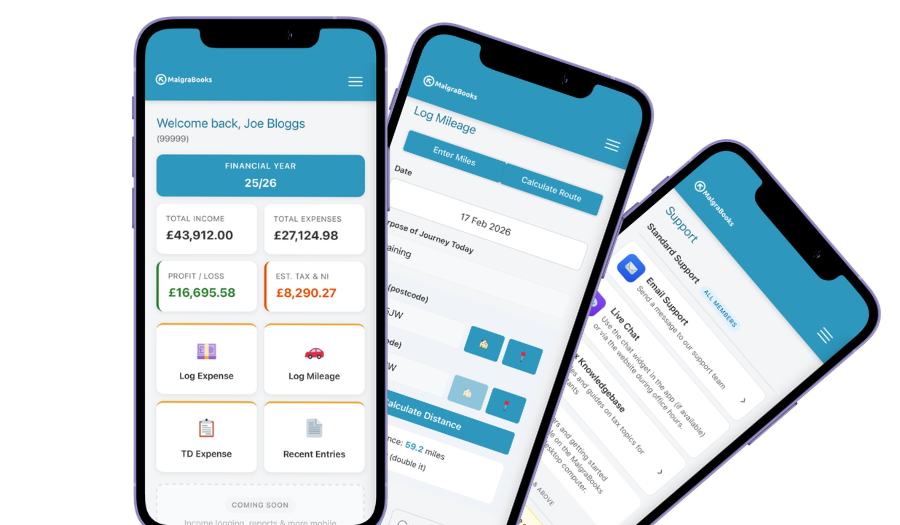
Access your accounts on your mobile
Designed for iPhone and Android phones, so you can add a payment, log a journey or scan a receipt between jobs, and check your reports and tax as you go.
See the mobile appHow Pulse helps
Pulse is our online bookkeeping system, with apps for iPhone and Android. Here’s what Brand Partners use most.
Sales and bonuses in one place
Add each customer’s payment as income on the day, and add your bonus when it reaches your bank, using your earnings statement. If a customer or a workplace wants an invoice, send one from your phone.
Creating an invoicePay online
Add your Stripe, SumUp or PayPal.Me link and a Pay online button appears on your invoices, so customers who aren’t in when you call can pay later. The money goes straight to you, and part payments are tracked.
Online paymentsScan your receipts
Photograph the gift bags, the postage receipt or a screenshot of your order and it’s saved against the expense. Handy when you’ve split an order between customers and yourself.
Receipt scannerMileage for deliveries
Enter postcodes or use your location, and Pulse works out the miles. Save your regular customers in the Address Book, so logging a delivery run takes seconds.
Address BookWorking from home
Answering messages, placing orders and posting on social media all happen at home. Log your hours in the app and Pulse works out the flat rate you can claim.
Working from homeStraight to HMRC
Pulse is recognised by HMRC for Making Tax Digital. Send your quarterly updates from Pulse, and your tax return if you choose that package.
Sending MTD updatesEverything in one package
Small Business Complete includes everything on this page. There are no invoice limits, and you can start partway through the year and add the months you've missed.
MalgraBooks is recognised by HMRC for Making Tax Digital. HMRC reference D5P1NR.
Small Business Complete
- Bookkeeping, invoicing and mileage in Pulse
- Unlimited receipt scanning
- Making Tax Digital quarterly updates
- Your tax return sent to HMRC
Questions Oriflame Brand Partners ask us
I mostly sell to friends and family. Do I need to register?
It depends on what customers pay you plus any bonuses, before you take off what you spent on products. If that’s more than £1,000 in a tax year, you need to register by 5 October after the end of the tax year you started in. Because the £1,000 is before costs, you can go over it even if you’ve made very little profit. How to register with HMRC
Do I pay tax on the discount on my own products?
No. Paying less for something you keep isn’t income. Just don’t claim those products as an expense. Bonuses are different. If money is paid to you, it’s income, even if it was worked out on your own orders.
Do I need to count my stock on 5 April?
Not if you use the cash basis, which is how most sole traders work. You claim products when you pay for them, whether or not they’ve sold yet. If you use traditional accounting, you value unsold stock at the end of the year. Ask us if you’re not sure which you use.
I have a job as well. Do my wages count towards Making Tax Digital?
No. Only your self-employed turnover and any rental income count towards the Making Tax Digital limits. Your wages still count when your tax bill is worked out, so they affect how much you pay, but they don’t decide whether you need to start. When you need to start
A customer paid me cash. Do I really need to record it?
Yes, every payment counts as income however it’s paid. The easiest habit is to add it in the app as soon as you’re back in the car, before it goes in your purse.
How long do I need to keep my records?
At least five years after the 31 January deadline for that tax year. That includes your order confirmations and earnings statements from the company. Records and receipt photos in Pulse count, so you don’t need paper copies as well. Keeping records
Got a question that isn't here? Send us a message and the team will get back to you.
Oriflame is a trade mark of its owner. MalgraBooks isn’t connected with Oriflame.