
Bookkeeping and Making Tax Digital (MTD) for self-employed plumbers
One day it’s a leak under the sink at 8am, the next it’s three boiler services and a quote for a new bathroom. In between you’re at the trade counter buying parts you’ll put on someone’s bill. Pulse keeps track of the invoices, the parts, the miles and your Making Tax Digital updates.
- Turn a quote into an invoice in one click
- Let customers pay online before you’ve packed the van
- Send your quarterly updates and tax return straight to HMRC
Rhys’s Monday
Plumbing and heating-
Leaves home7:45am
-
Mrs Whitaker, Beech GroveEmergency call-out for a leak under the sink, paid by card on the doorstep£952.4 miles from home
-
Mr Brennan, Carlton RoadAnnual boiler service, paid online from the invoice£801.8 miles
-
Trade counter, Hyde RoadPicks up a £120 diverter valve on account, receipt scanned3.1 miles
-
Flat 2, Kingsley RoadCombi repair for the landlord. £150 for the valve plus £60 labour, invoiced£2102.7 miles
-
Mr and Mrs Lowe, Moss LaneAccept the bathroom quote and pay a deposit online£5004.0 miles
-
Back home5:15pm4.0 miles
When Making Tax Digital starts for you
Making Tax Digital for Income Tax means keeping your records digitally and sending HMRC a short update every three months, then a final declaration after the tax year ends. Whether you're in depends on your turnover, the total you charge your customers before any expenses, not your profit.
- From 6 April 2026Over £50,000Already started
- From 6 April 2027Over £30,000Based on your 2025/26 tax return
- From 6 April 2028Over £20,000Based on your 2026/27 tax return
An example. You charge customers about £800 a week for labour and parts together, and work 46 weeks a year. That’s £36,800 of turnover. Turnover is before expenses, so the parts you put on your invoices count in full, even though you paid for them. If your 2025/26 tax return shows that, you’ll need to use Making Tax Digital from 6 April 2027.
The quarterly updates are due by 7 August, 7 November, 7 February and 7 May. If you have other self-employed work or rent out a property, that income counts towards the total too. When do I need to start?
Parts on your invoices
This is where plumbers’ books most often go wrong. You buy a valve for £120, fit it and charge the customer £150 for it. It’s tempting to record only the £30 you made on it, or to leave the part out altogether because the customer paid for it.
The simple rule is that the whole invoice is your income, and what you paid for the part is your expense. It comes out the same in the end, but your turnover is right, and turnover is what decides when Making Tax Digital applies to you.
Keep the receipt for every part and note which job it was for. If you buy on a trade counter account, keep the itemised invoices, not just the monthly statement, so you can match parts to jobs. If you’re not registered for VAT, record the full price you paid, VAT included.
If a customer buys their own boiler or taps and you just fit them, only your labour is income, and there’s nothing for you to claim for the parts.
Read more about allowable expenses and stock and goods for resale.
| On the invoice | Amount |
|---|---|
| Labour | £60 |
| Diverter valve | £150 |
| Invoice total, your income | £210 |
| Valve from the trade counter, your expense | £120 |
| Profit on the job | £90 |
Your other costs, like the van, tools and insurance, come off that £90 later in the year, so you’re only taxed on what’s left.
What you can claim as a plumber
Every allowable expense brings down the profit you pay tax and National Insurance on. These are the ones plumbers claim most. Keep the receipt for each, or scan it into Pulse.
Parts and materials
Pipe, fittings, valves, radiators and anything else you buy and fit on a customer’s job, whether you pay at the counter or on account.
Your van
Either 55p a mile for the first 10,000 business miles then 25p, or the actual running costs plus capital allowances on the van. Once you’ve picked a method for a van, you stick with it, so ask us which suits you. Cars, vans and mileage
Tools and kit
Grips, cutters, a blowtorch, drill bits and repairs. Bigger items like a press-fit tool or a drain camera may need to go in as a capital allowance.
Gas Safe and training
Your Gas Safe registration if you do gas work, and courses that keep the skills you already use up to date. Training costs
Insurance
Public liability insurance, and cover for the tools you keep in the van.
Workwear and PPE
A branded polo or fleece, safety boots, knee pads and gloves. Everyday clothes don’t count. Clothing expenses
Phone
The business share of your mobile, the one that rings at 10pm when a pipe bursts. Phone and broadband
Advertising
Leaflets, a simple website, online ads or a paid listing on a trade directory. Marketing costs
What you can’t claim
- Parts and materials for work on your own home
- Parts the customer buys and gives you to fit
- Fuel and running costs for your van if you claim mileage for it
- Everyday clothes, even old ones you keep for work
- Parking and speeding fines
For the full list, see Allowable expenses, what are they?
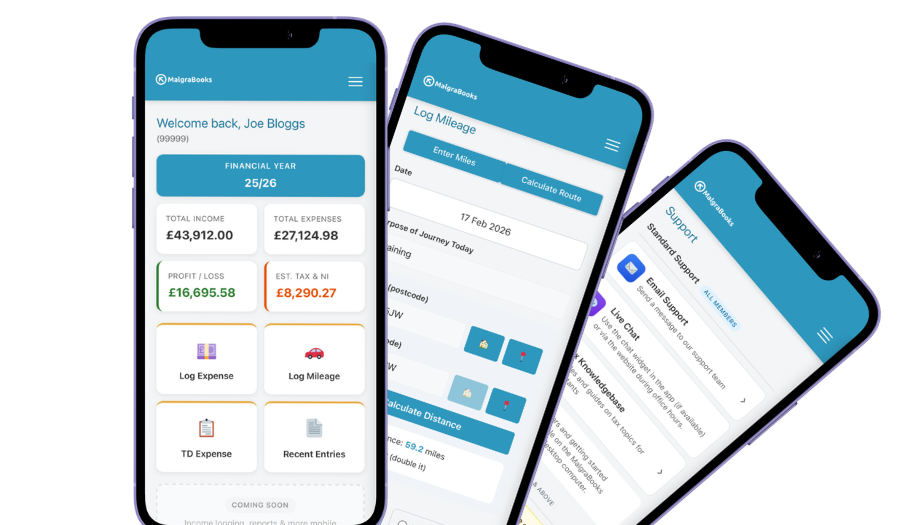
Access your accounts on your mobile
Designed for iPhone and Android phones, so you can add a payment, log a journey or scan a receipt between jobs, and check your reports and tax as you go.
See the mobile appHow Pulse helps
Pulse is our online bookkeeping system, with apps for iPhone and Android. Here’s what plumbers use most.
Quotes into invoices
Send a quote for the new bathroom or boiler swap. When the customer says yes, turn it into an invoice in one click, with nothing to type twice.
QuotesPaid on the doorstep
Add your Stripe, SumUp or PayPal.Me link and a Pay online button appears on your invoices. The money goes straight to you, and deposits and part payments are tracked.
Online paymentsScan receipts at the counter
Take a photo of the receipt before you’ve left the merchant and it’s saved against the expense. No more faded receipts in the van door.
Receipt scannerMileage between jobs
Enter postcodes or use your location, and Pulse works out the miles. Save your merchant and regular landlords’ properties in your address book so each journey takes seconds.
Logging mileageYearly services
Service the same landlord’s boilers every year? Set up a yearly recurring invoice and Pulse creates it when it’s due. Keep it as a draft until the job’s done, then send it.
Recurring invoicesStraight to HMRC
Pulse is recognised by HMRC for Making Tax Digital. Send your quarterly updates from Pulse, and your tax return if you choose that package.
Sending MTD updatesEverything in one package
Small Business Complete includes everything on this page. There are no invoice limits, and you can start partway through the year and add the months you've missed.
MalgraBooks is recognised by HMRC for Making Tax Digital. HMRC reference D5P1NR.
Small Business Complete
- Bookkeeping, invoicing and mileage in Pulse
- Unlimited receipt scanning
- Making Tax Digital quarterly updates
- Your tax return sent to HMRC
Questions plumbers ask us
Can I claim the drive from home to my first job?
Usually, yes. If you run your business from home and go out to different customers’ homes, HMRC treats the drive from home to each job, between jobs and to the merchant as business travel. If you spend months on one big job in the same place, that can start to look like commuting, so ask us first. Cars, vans and mileage
A customer pays a deposit before I start. How do I record it?
Record it as it comes in. In Pulse, add it to the invoice as a part payment, so you can see what’s still owed and the rest goes in when they pay the balance.
I do some work for builders too. Does CIS apply?
Homeowners aren’t contractors under the Construction Industry Scheme, so they pay you in full. Work you do for a building firm or other contractor may have CIS taken off. If that’s you, see our page for CIS subcontractors.
Do I need to register for VAT?
Only if your turnover goes over £90,000 in any rolling 12 months. Remember that’s everything you charge, parts included, not just your labour. VAT explained
How long do I need to keep my receipts?
At least five years after the 31 January deadline for that tax year. Receipt photos in Pulse count, so you don’t need to keep the paper copies as well. Keeping records
I’ve been using a spreadsheet. Can I switch partway through the year?
Yes. You can add the earlier months of the tax year when you join, so the whole year sits in Pulse ready for your updates and tax return.
Got a question that isn't here? Send us a message and the team will get back to you.