
Bookkeeping and Making Tax Digital (MTD) for self-employed social media managers
Filming in a client’s café in the morning, scheduling next week’s posts after lunch and replying to comments on someone else’s account at nine at night. Most of your clients pay a monthly retainer, some want their ads run as well, and the laptop, phone and apps you rely on all cost something every month. Pulse sends the retainer invoices for you, keeps your costs in one place and gets your Making Tax Digital updates to HMRC.
- Send monthly retainer invoices automatically
- Record ad spend you put on your own card for clients
- Send your quarterly updates and tax return straight to HMRC
Chloe’s Wednesday
1st of the month, retainer day-
Leaves home8:45am, camera bag and ring light packed
-
The Corner Cup, King StreetContent shoot for November’s posts. Monthly retainer invoice sent by Pulse at 9am£4502.8 miles from home
-
Harper’s Opticians, High StreetQuick strategy meeting about Christmas posts. Monthly retainer£3501.6 miles
-
Fernlea Garden CentreFilms the new Christmas display. Retainer £300, plus £120 of ads Chloe paid for on her card£4204.2 miles
-
Back home3:30pm, editing and scheduling until six5.4 miles
When Making Tax Digital starts for you
Making Tax Digital for Income Tax means keeping your records digitally and sending HMRC a short update every three months, then a final declaration after the tax year ends. Whether you're in depends on your turnover, the total you charge your customers before any expenses, not your profit.
- From 6 April 2026Over £50,000Already started
- From 6 April 2027Over £30,000Based on your 2025/26 tax return
- From 6 April 2028Over £20,000Based on your 2026/27 tax return
An example. You look after six local businesses on monthly retainers of £400 each. That’s £2,400 a month, or £28,800 a year. You also run ads for two of them on your own card and charge them back, which comes to £3,000 over the year. Recharged ad spend like that usually counts as turnover too, so your total is £31,800. If your 2025/26 tax return shows that, you’ll need to use Making Tax Digital from 6 April 2027.
The quarterly updates are due by 7 August, 7 November, 7 February and 7 May. If you have other self-employed work or rent out a property, that income counts towards the total too. When do I need to start?
Retainers, ad spend and whose card it’s on
This is the one social media managers most often get wrong. A client asks you to boost their posts on Instagram or Facebook, or run a TikTok campaign, and it’s quicker to put it on your own card and add it to their invoice. That’s fine, but it changes your books.
If it goes through your card. When you pay for a client’s ads and charge them back, the amount you charge is usually your income and what you paid is your expense. Your profit comes out the same, but your turnover goes up. Turnover is what decides when Making Tax Digital applies to you, and when you have to register for VAT, so a big ad budget on your card can bring both closer than you’d expect.
If the client pays the platform. When the client’s own card is on their ad account, the ad spend is their cost, not yours. It doesn’t go in your books at all. Your income is just your fee for managing it.
The exception. HMRC has strict conditions for treating a payment as a disbursement, where you pay purely as your client’s agent and pass on the exact cost, shown separately on the invoice. It’s mainly a VAT rule, and ad spend on your own account often won’t meet it. If you run large budgets for clients, ask us before you leave anything out of your turnover.
Your retainers. In Pulse you set each client up once with their monthly fee. Pulse creates the invoice on the same day every month and either sends it automatically or saves it as a draft, which is handy for clients whose ad spend changes from month to month.
Read more about recurring invoices, marketing and subscriptions and HMRC’s guide to costs or disbursements passed to customers.
| How it’s paid | In your books |
|---|---|
| Client’s card on their own ad account | Nothing. Only your management fee is income |
| Your card, charged back at cost | The recharge is income, the ad spend is an expense |
| Your card, with a fee added on top | All of it is income, the ad spend is an expense |
| Ads to find your own clients | An expense, with no income to match |
Say you pay £500 for a client’s ads and charge them £500 back. Your profit doesn’t change, but your turnover is £500 higher. Twelve months of that is £6,000 of turnover on top of your fees.
What you can claim as a social media manager
Every allowable expense brings down the profit you pay tax and National Insurance on. These are the ones social media managers claim most. Keep the receipt or invoice for each, or scan it into Pulse.
Laptop, camera and kit
Your laptop, a camera or gimbal, a ring light, a tripod and a mic. Most sole traders use the cash basis and claim these as an expense. With traditional accounting they go in as a capital allowance. If you use them personally too, claim the business share.
Software and apps
Scheduling tools, design and editing apps, stock photo libraries and cloud storage. Subscriptions you renew regularly are allowable expenses. Office and equipment
Phone and broadband
The business share of your mobile and home internet, which for most social media managers is a big share. Phone and broadband
Travel to clients
Driving to shoots and meetings at clients’ premises, at 55p a mile for the first 10,000 business miles in a car, then 25p. Cars, vans and mileage
Ad spend you charge back
Ads you pay for on your own card for a client. The cost is your expense and what you charge the client is your income.
Promoting yourself
Your own website, portfolio hosting, business cards and ads you run to find new clients. Marketing costs
Courses and training
A paid ads course, a video editing course or a short course to keep up with platform changes, as long as it’s for the work you already do. Conferences and training
Working from home
If you spend 25 hours or more a month working at home, you can claim a flat rate of £10 to £26 a month. Over 100 hours a month is £26. Simplified expenses
What you can’t claim
- Ad spend a client pays for on their own card
- Clothes you wear on camera or to meet clients, even if you bought them for work
- The personal share of your phone, laptop and broadband
- Personal subscriptions, like the music or TV service you have on while you edit
- Parking fines outside a client’s shop
For the full list, see Allowable expenses, what are they?
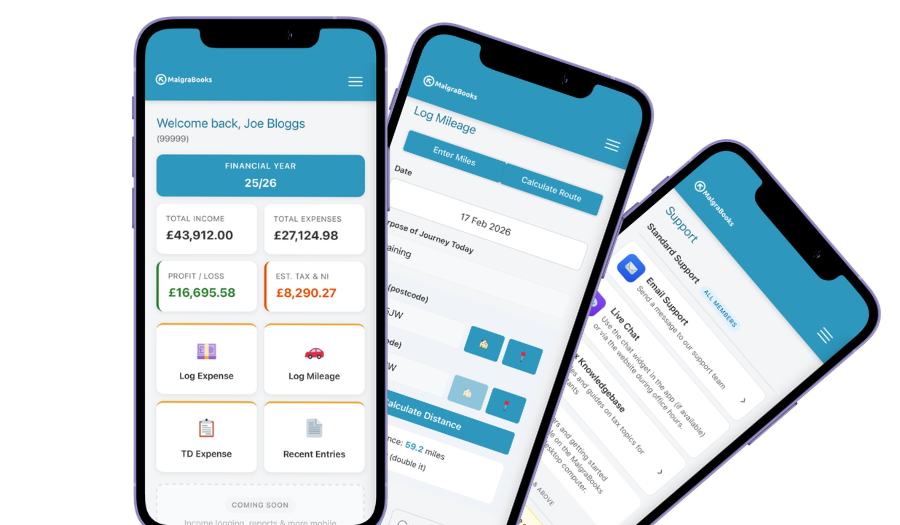
Access your accounts on your mobile
Designed for iPhone and Android phones, so you can add a payment, log a journey or scan a receipt between jobs, and check your reports and tax as you go.
See the mobile appHow Pulse helps
Pulse is our online bookkeeping system, with apps for iPhone and Android. Here’s what social media managers use most.
Retainer invoices
Set each client up once and Pulse creates their invoice every month, or weekly, every 2 weeks, every 4 weeks, quarterly or yearly if that’s how you’ve agreed it. Send it automatically or save it as a draft to check first.
Recurring invoicesQuotes for new clients
Pitching a café a monthly package, or a one-off launch campaign? Send a quote from Pulse, and when they say yes, turn it into an invoice in one click.
QuotesSubscriptions remembered
Your scheduling tool, design app, cloud storage and phone contract all come round every month. Add them as recurring expenses and Pulse asks you to confirm each one when it’s due.
Recurring expensesHours at the laptop
Editing, scheduling and replying to comments mostly happens at home. Log your working from home hours and Pulse works out the flat rate you can claim.
Working from homeMiles to shoots
Enter postcodes or use your location, and Pulse works out the miles. Save each client’s shop or office in the Address Book so the drive to a shoot takes seconds to log.
Logging mileageStraight to HMRC
Pulse is recognised by HMRC for Making Tax Digital. Send your quarterly updates from Pulse, and your tax return if you choose that package.
Sending MTD updatesEverything in one package
Small Business Complete includes everything on this page. There are no invoice limits, and you can start partway through the year and add the months you've missed.
MalgraBooks is recognised by HMRC for Making Tax Digital. HMRC reference D5P1NR.
Small Business Complete
- Bookkeeping, invoicing and mileage in Pulse
- Unlimited receipt scanning
- Making Tax Digital quarterly updates
- Your tax return sent to HMRC
Questions social media managers ask us
I manage a couple of accounts alongside my job. Do I need to register?
If your clients pay you more than £1,000 in a tax year, yes, even if you have a job as well. That’s what they pay you before any costs. You need to register by 5 October after the end of the tax year you started in. For example, if you took on your first client in June 2026, that’s in the 2026/27 tax year, so you’d need to register by 5 October 2027. How to register with HMRC
A client wants me to run their ads. Should I put them on my card?
You can, but it adds to your turnover, which counts towards Making Tax Digital and the VAT threshold. The simpler option is for the client to add their own card to their ad account and give you access to manage it. Then the ad spend never touches your books and you just invoice your fee. If you do use your card, record the ad spend as an expense and put it on that client’s invoice.
Can I claim the drive to a client’s shoot?
Usually, yes. If you work from home and go out to different clients’ premises for shoots and meetings, those journeys are business travel, including the drive from home and back. If you spend most days working at one client’s office, that can look more like commuting, so ask us first. Cars, vans and mileage
I find some clients through a freelancing website. Does HMRC know?
It can do. Since 1 January 2024, websites and apps that people use to sell services, including freelancing sites, collect details of what sellers earn and report them to HMRC once a year. Being reported doesn’t mean you owe more tax, but the income should be in your records either way. HMRC’s guide to digital platforms
Do I need to register for VAT?
Only if your turnover goes over £90,000 in any rolling 12 months. Most self-employed social media managers are well under it, but remember ad spend you recharge from your own card usually counts towards it. VAT explained
I’ve been using a spreadsheet. Can I switch partway through the year?
Yes. Add the earlier months of the tax year when you join, so the whole year sits in Pulse ready for your quarterly updates and tax return. Then set up your retainers as recurring invoices and you won’t need to type them again.
Got a question that isn't here? Send us a message and the team will get back to you.