
Bookkeeping and Making Tax Digital (MTD) for self-employed virtual assistants and PAs
Three or four clients, one laptop and a diary that isn’t even yours. You clear one business’s inbox before nine, book another’s appointments by lunch and chase a third’s unpaid invoices in the afternoon. Then you still have to send your own. Pulse sends your monthly invoices, shows you who’s paid and gets your Making Tax Digital updates to HMRC.
- Monthly retainer invoices that go out on their own
- Hourly invoices saved as drafts so you can add the hours first
- Send your quarterly updates and tax return straight to HMRC
Becky’s Wednesday
£25 an hour, four clients-
At her desk8:00am, spare room
-
Pennine Lettings2 hours on the inbox and viewings. Her monthly retainer, 18 hours for £450, is paid today by bank transfer£450
-
Bloom and Stem florist1 hour on wedding enquiries, added to this month’s draft invoice£25
-
Fielding Joinery2 hours typing up quotes and sorting next week’s jobs, invoiced at the end of the month£50
-
Whitworth Physio, on site3 hours covering reception while the receptionist is on holiday£756.5 miles from home
-
Back home4:45pm6.5 miles
When Making Tax Digital starts for you
Making Tax Digital for Income Tax means keeping your records digitally and sending HMRC a short update every three months, then a final declaration after the tax year ends. Whether you're in depends on your turnover, the total you charge your customers before any expenses, not your profit.
- From 6 April 2026Over £50,000Already started
- From 6 April 2027Over £30,000Based on your 2025/26 tax return
- From 6 April 2028Over £20,000Based on your 2026/27 tax return
An example. You have three clients on monthly retainers of £450, £600 and £750. That’s £1,800 a month, or £21,600 a year. On top of that you do about 10 hours a week of hourly work at £25 for 46 weeks of the year, which is another £11,500. Together that’s £33,100 of turnover. If your 2025/26 tax return shows that, you’ll need to use Making Tax Digital from 6 April 2027.
The quarterly updates are due by 7 August, 7 November, 7 February and 7 May. If you have other self-employed work or rent out a property, that income counts towards the total too. When do I need to start?
Retainers, hours and working from home
Most virtual assistants we talk to are good at other people’s admin and behind on their own. These are the four things that trip them up.
Retainers and hours. Set each client up once in Pulse as a monthly recurring invoice. For a fixed retainer, let Pulse send it automatically on the same day each month. For hourly clients, have Pulse save it as a draft instead, so you can put in this month’s hours, or the extra hours over a retainer, before you send it. Most sole traders use the cash basis, so the money counts as income when the client pays you, not when you send the invoice.
Working from home. You can claim a flat rate based on your hours at home each month (see the table), or a fair share of your actual household bills, such as heating, electricity, Council Tax and rent or mortgage interest. If your spare room is one of five rooms and £3,000 of those bills is shared across them, a fifth is £600 a year. The flat rate at 101 hours or more is £312 a year. Pick whichever is right for you and keep a note of how you worked it out. If a room is used only for work, ask us first, as it can affect the tax when you sell your home.
Software and subscriptions. Microsoft 365, Google Workspace, Canva, Calendly, Zoom and a password manager can add up to more than people think. Software you pay for on a regular subscription is an allowable expense. Add each one as a recurring expense in Pulse and it asks you to confirm the payment each time it’s due, so none get missed. If you use one for personal things too, only claim the business share.
Late payers. When a business client pays late, you can charge interest at 8% plus the Bank of England base rate, and a fixed sum on top, depending on the size of the debt. You don’t have to, and plenty of VAs would rather not with a good client, but it’s worth knowing. Clear payment terms on every invoice and a Pay online button help most. In Pulse, mark each invoice as paid when the money arrives, and whatever isn’t marked is still owed. Claiming debt recovery costs (gov.uk)
Read more about recurring invoices, recurring expenses, simplified expenses and marking an invoice as paid.
| Hours at home a month | Per month |
|---|---|
| 25 to 50 | £10 |
| 51 to 100 | £18 |
| 101 or more | £26 |
The flat rate doesn’t include your phone or internet. Claim the business share of those separately, whichever method you use for the rest of the house.
| Amount owed | Fixed sum |
|---|---|
| Under £1,000 | £40 |
| £1,000 to £9,999.99 | £70 |
| £10,000 or more | £100 |
These are for clients that are businesses. They don’t apply to private individuals who pay you as a personal PA.
What you can claim as a virtual assistant
Every allowable expense brings down the profit you pay tax and National Insurance on. These are the ones VAs and freelance PAs claim most. Keep the receipt or emailed invoice for each, or scan it into Pulse.
Laptop and desk kit
Your laptop, a second screen, a headset and a printer. Most sole traders use the cash basis and claim these as an expense. With traditional accounting they go in as a capital allowance.
Software and apps
Email, calendar and office software, scheduling tools, design apps and file storage you pay for to do clients’ work. Office and equipment
Working from home
A flat £10 to £26 a month if you work 25 hours or more at home, or a fair share of your household bills. Simplified expenses
Phone and broadband
The business share of your mobile and home internet, which you’re on for clients most of the day. Phone and broadband
Stationery and postage
Paper, printer ink, envelopes and stamps, including stamps for letters you post out for clients.
Training
Courses that build skills you use for clients, such as a course on a bookkeeping app or project management tool they use. Conferences and training
Insurance and memberships
Professional indemnity insurance, membership of a VA or PA professional body, and the data protection fee to the Information Commissioner’s Office if you need to pay it.
Trips to clients
55p a mile for the first 10,000 business miles in your car, then 25p, plus parking and train fares for on-site days and meetings. Cars, vans and mileage
What you can’t claim
- Coffee or lunch with a client or a potential client, as that’s entertaining
- The personal share of your phone, broadband and software subscriptions
- Smart clothes for client meetings, even if you only wear them for work
- Travel to one client’s office if you go in every day like an employee (ask us if that’s you)
- Parking fines and other penalties
For the full list, see Allowable expenses, what are they?
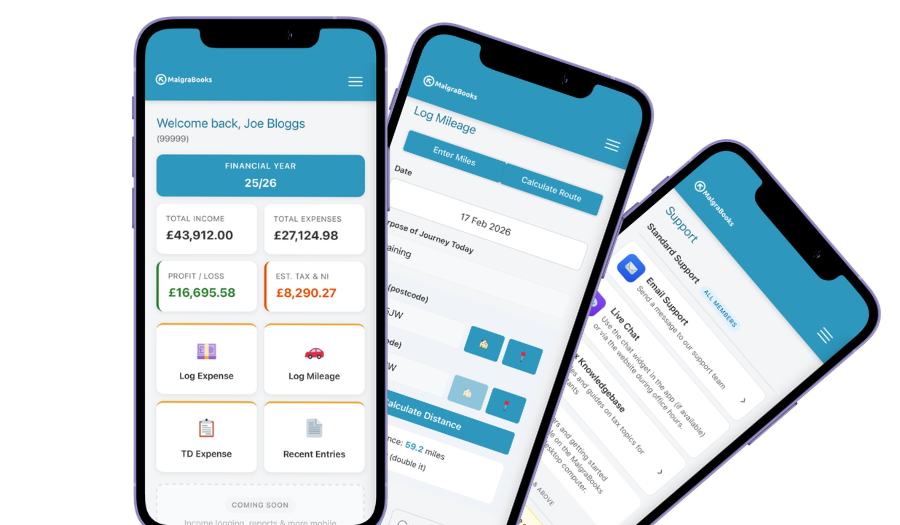
Access your accounts on your mobile
Designed for iPhone and Android phones, so you can add a payment, log a journey or scan a receipt between jobs, and check your reports and tax as you go.
See the mobile appHow Pulse helps
Pulse is our online bookkeeping system, with apps for iPhone and Android. Here’s what virtual assistants use most.
Monthly invoices
Set up each client once. Retainers go out automatically every month, and hourly clients’ invoices wait as drafts until you’ve put the hours in. Weekly, every 2 weeks, every 4 weeks, quarterly and yearly work too.
Recurring invoicesPay online button
Add your Stripe, SumUp or PayPal.Me link and clients can pay straight from the invoice. The money goes to you, not us, and part payments are tracked.
Online paymentsSee who’s paid
When a bank transfer lands, mark the invoice as paid. Anything still unpaid is your list of clients to chase, for once on your own behalf.
Marking an invoice as paidSubscriptions remembered
Add your software, phone and insurance as recurring expenses. Pulse asks you to confirm each one when it’s due, so a monthly app fee never goes unclaimed.
Recurring expensesHours at home
Log the hours you spend at your desk on client work, and Pulse works out your working from home allowance for the month.
Working from homeStraight to HMRC
Pulse is recognised by HMRC for Making Tax Digital. Send your quarterly updates from Pulse, and your tax return if you choose that package.
Sending MTD updatesEverything in one package
Small Business Complete includes everything on this page. There are no invoice limits, and you can start partway through the year and add the months you've missed.
MalgraBooks is recognised by HMRC for Making Tax Digital. HMRC reference D5P1NR.
Small Business Complete
- Bookkeeping, invoicing and mileage in Pulse
- Unlimited receipt scanning
- Making Tax Digital quarterly updates
- Your tax return sent to HMRC
Questions virtual assistants ask us
Do I need to register as self-employed?
If you earn more than £1,000 a year from VA work before any costs, yes. You need to register by 5 October after the end of the tax year you started in. For example, if you took on your first client in June 2026, that’s by 5 October 2027. How to register with HMRC
I still have a PA job and do VA work on the side. Does my salary count for Making Tax Digital?
No. Only your self-employed turnover and any rental income count towards the Making Tax Digital threshold. Your wages from the PA job are still taxed, but through PAYE as normal. So if your VA work brings in £12,000 a year and you have no rental income, you’re under the current thresholds, even with a full-time salary on top. When do I need to start MTD?
I find some clients through a freelance website. Does HMRC know what I earn?
Probably, yes. Since 1 January 2024, websites and apps that people use to sell services, including freelancing, have had to report what they pay their sellers to HMRC each year. The platform has to give you a copy of what it reports. That doesn’t mean you owe more tax, but HMRC can see the figures, so make sure every payment from the site is in your records, along with the fees it takes. Selling goods or services on a digital platform (gov.uk)
A client paid me up front for a block of 10 hours. When does it count as income?
On the cash basis, which most sole traders use, it counts when the money reaches you, even if you do some of the hours next month. Record it as income in Pulse on the day it’s paid. If you use traditional accounting instead, it’s a little different, so ask us.
A new client wants a price for a one-off project. Can Pulse do that?
Yes. Send a quote for the inbox clear-out or the event you’re organising, and when they say yes, turn it into an invoice in one click. Quotes
Do I need to register for VAT?
Only if your turnover goes over £90,000 in any rolling 12 months. Most self-employed virtual assistants are well under this. VAT explained
Got a question that isn't here? Send us a message and the team will get back to you.