Skip to content
  1. Home
  2. Knowledge Base
  3. Getting Started
  4. How can I check if I’ve sent my Tax Return?

How can I check if I’ve sent my Tax Return?

It’s easy to forget when you sent your tax return – however you can check your submsision date within your Personal Tax Account.

If you have only just activated your Self Assessment account, you need to wait 72 hours until your can send a tax return. HMRC’s system may take up to 72 additional hours to show any returns which have been submitted using the below route

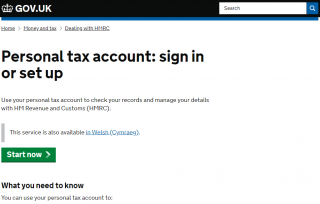
1. Login to your Personal Tax Account

The HMRC online services sign in screen

2. Verify using one of the methods listed
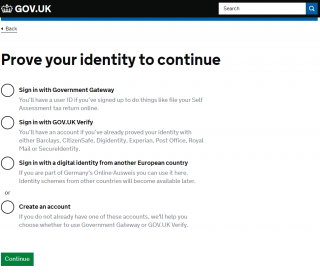
The HMRC identity verification step

3. Once verified, on the home screen choose ‘Self Assessment’
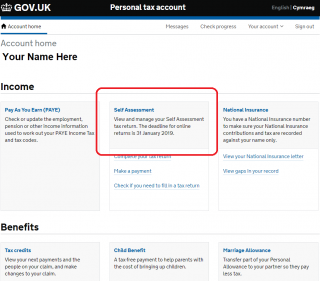
The HMRC online account home screen

4. On the Self Assessment screen, choose ‘More Self Assessment Details’ (shown in purple text below)
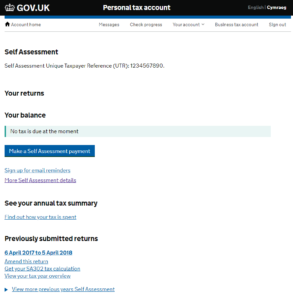
The Self Assessment section of an HMRC online account

5. Select ‘Tax return options’ from the right hand side list
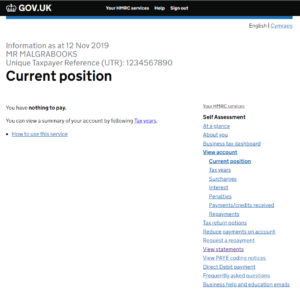
The tax return options menu in an HMRC online account

6. Select the appropiate tax year from the drop down, to view the relevant dates
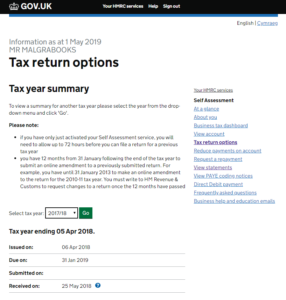
The date a tax return was received, shown in an HMRC online account

Note:

  • Issued on: Date HMRC advised you (usually in writing) that a tax return is due
  • Due on: the date when your tax return was due by
  • Submitted on: the date when you submitted your return through HMRC’s system. If you use a different system to submit your return, this may be blank – as with the example shown above
  • Received on: The date when HMRC received the tax return
Was this article helpful?

Related Articles

Making Tax Simple and Easy

Find out what makes MalgraBooks different to other providers, and why we’re the UK’s most popular provider of accounting software to Self-Employed Slimming World Consultants
Pulse Accounts System
Back To Top