
Bookkeeping and Making Tax Digital (MTD) for self-employed photographers
A wedding on Saturday, a newborn shoot on Tuesday, and hours of editing at the kitchen table in between. Couples pay a deposit months before the big day and the balance just before it, and there’s always another lens you need. Pulse keeps track of the quotes, deposits, miles and kit, and sends your Making Tax Digital updates to HMRC.
- Turn a wedding quote into an invoice in one click
- Take deposits and balances online, with part payments tracked
- Send your quarterly updates and tax return straight to HMRC
Owen’s Saturday
Weddings and portraits-
Leaves home8:30am, two bodies and three lenses in the bag
-
The Wilsons, Beech ParkHalf-hour family mini session, paid by card£753.0 miles from home
-
Bride’s parents, Ashfield RoadGetting-ready shots for Laura and Matt. They pay the balance online from the invoice£1,2004.5 miles
-
St Mary’s Church, Church LaneCeremony at 1pm2.0 miles
-
Oakfield HallReception and first dance. Laura’s aunt books a family shoot and pays a deposit online£504.5 miles
-
Back home10:30pm, cards backed up before bed12.0 miles
When Making Tax Digital starts for you
Making Tax Digital for Income Tax means keeping your records digitally and sending HMRC a short update every three months, then a final declaration after the tax year ends. Whether you're in depends on your turnover, the total you charge your customers before any expenses, not your profit.
- From 6 April 2026Over £50,000Already started
- From 6 April 2027Over £30,000Based on your 2025/26 tax return
- From 6 April 2028Over £20,000Based on your 2026/27 tax return
An example. You shoot 20 weddings a year at £1,500 each, which is £30,000, and take another £8,000 from family shoots, headshots and prints. That’s £38,000 of turnover. Turnover is everything you’re paid before costs, so it doesn’t matter that you spent a lot of it on kit. If your 2025/26 tax return shows that, you’ll need to use Making Tax Digital from 6 April 2027.
The quarterly updates are due by 7 August, 7 November, 7 February and 7 May. If you have other self-employed work or rent out a property, that income counts towards the total too. When do I need to start?
Your kit, and when a deposit counts
These are the two things photographers ask us about most.
Cameras, lenses and computers. Most self-employed people now use the cash basis, which has been the default since April 2024. On the cash basis, a camera body, lens, flash or laptop you buy to keep and use in your business is claimed as an ordinary expense in the year you buy it. You don’t spread it over several years. If you’ve opted out and use traditional accounting, it goes in as a capital allowance instead, and the annual investment allowance usually lets you claim the full cost in the year you buy it too.
If the family borrows the camera for holidays, or the laptop is the household computer as well, you can only claim the business share.
Wedding deposits. On the cash basis, income counts when you receive it. So a deposit counts in the tax year, and the Making Tax Digital quarter, it lands in your account, even if the wedding is next year. The balance counts when that’s paid. If you’ve opted out of the cash basis, a deposit counts when you shoot the wedding, or when it’s clear the wedding isn’t going ahead and you’re keeping the money.
If you ever give a deposit back, or you’re not sure which basis you use, ask us.
Read more about capital allowances and office equipment, or HMRC’s guide to the cash basis.
| Laura and Matt | Amount |
|---|---|
| Deposit paid in March 2027, counts in 2026/27 | £300 |
| Balance paid in June 2027, counts in 2027/28 | £1,200 |
| Wedding package total | £1,500 |
On the cash basis. The deposit goes in your quarterly update for the quarter to 5 April and the balance in the one for the quarter to 5 July.
What you can claim as a photographer
Every allowable expense brings down the profit you pay tax and National Insurance on. These are the ones photographers claim most. Keep the receipt for each, or scan it into Pulse.
Cameras, lenses and lighting
Bodies, lenses, flashguns, tripods, memory cards and spare batteries, plus repairs and sensor cleans. Read how bigger items work above, or see capital allowances.
Computer and storage
The laptop or desktop you edit on, a calibrated monitor, card readers and backup drives. Only the business share if the family uses them too. Office equipment
Software and gallery hosting
Editing software, online client galleries, cloud backup and your website. Subscriptions
Albums and prints
Albums, prints, frames and USB boxes you buy to hand over to clients as part of their package.
Travel to shoots
Mileage to venues and locations, parking, and train fares. A hotel the night before a wedding a long way from home counts too. Cars, vans and mileage
Insurance
Public liability insurance, and cover for your cameras and lenses against loss, theft or damage.
Advertising and wedding fairs
A stand at a wedding fair, a paid directory listing, sample albums for showing couples, and social media ads. Marketing costs
Editing at home
Culling and editing a wedding can take days. If you work at home for 25 hours or more a month, you can claim a flat rate of £10 to £26 a month. Simplified expenses
What you can’t claim
- The smart outfit you wear to weddings, because it’s everyday clothing
- The personal share of a camera or laptop the family uses too
- Fuel and running costs for your car if you claim mileage for it
- The trip from home to a studio you rent and work from every day
- Parking and speeding fines
For the full list, see Allowable expenses, what are they?
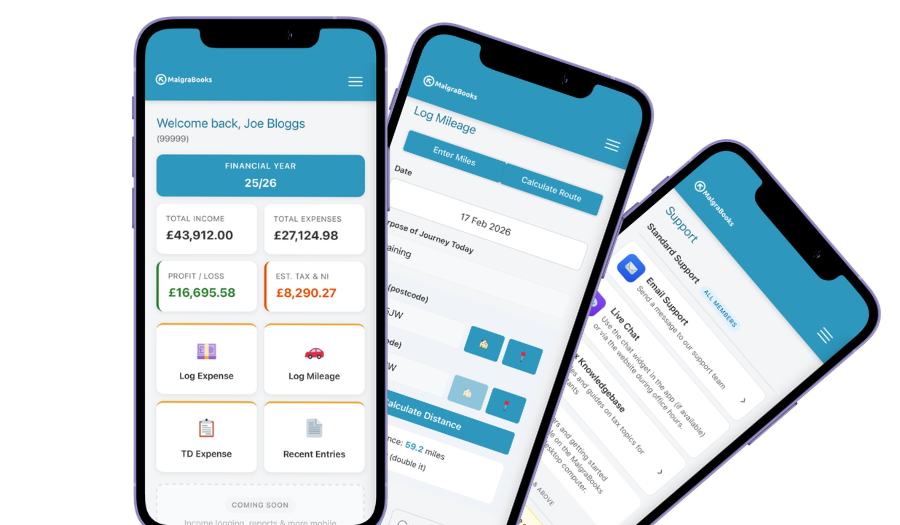
Access your accounts on your mobile
Designed for iPhone and Android phones, so you can add a payment, log a journey or scan a receipt between jobs, and check your reports and tax as you go.
See the mobile appHow Pulse helps
Pulse is our online bookkeeping system, with apps for iPhone and Android. Here’s what photographers use most.
Quotes into invoices
Send a couple a quote for their wedding package. When they book, turn it into an invoice in one click, with nothing to type twice.
QuotesDeposits and balances online
Add your Stripe, SumUp or PayPal.Me link and a Pay online button appears on your invoices. The money goes straight to you, and Pulse tracks the deposit and what’s still owed.
Online paymentsMileage to every shoot
Enter postcodes or use your location, and Pulse works out the miles. Save the venues you shoot at often in your address book so each journey takes seconds.
Logging mileageSubscriptions remembered
Editing software, gallery hosting and cloud backup all come out every month or year. Add them as recurring expenses and Pulse asks you to confirm each one when it’s due.
Recurring expensesScan your receipts
Photograph the receipt for a new lens, a stack of memory cards or a client’s album in the app and it’s saved against the expense, ready if HMRC ever asks.
Receipt scannerStraight to HMRC
Pulse is recognised by HMRC for Making Tax Digital. Send your quarterly updates from Pulse, and your tax return if you choose that package.
Sending MTD updatesEverything in one package
Small Business Complete includes everything on this page. There are no invoice limits, and you can start partway through the year and add the months you've missed.
MalgraBooks is recognised by HMRC for Making Tax Digital. HMRC reference D5P1NR.
Small Business Complete
- Bookkeeping, invoicing and mileage in Pulse
- Unlimited receipt scanning
- Making Tax Digital quarterly updates
- Your tax return sent to HMRC
Questions photographers ask us
I only do a few shoots on the side. Do I need to register?
If your photography brings in more than £1,000 in a tax year before costs, yes. You need to register by 5 October after the end of the tax year you started in. If your first paid shoot was in May 2026, that’s by 5 October 2027. You can have a job and be self-employed at the same time. How to register with HMRC
A couple cancelled and I kept the deposit. What do I do?
On the cash basis, nothing more. The deposit already counted as income when they paid it. If you use traditional accounting, it counts once it’s clear the wedding isn’t going ahead. If you give some or all of it back, ask us how to record it.
I sold my old camera when I upgraded. Is that income?
Usually, yes. On the cash basis, if you claimed the camera as an expense when you bought it, the money you get for it goes in as business income. If you only claimed part of the cost because you used it privately too, only the same part counts. If you use traditional accounting, the sale goes through your capital allowances instead.
Can I claim the drive to a wedding venue?
Usually, yes. If you work from home and travel out to different venues and locations, those journeys are business travel, there and back. If you rent a studio and work there most days, the trip from home to the studio is commuting, but trips from the studio out to shoots still count. Cars, vans and mileage
I sell prints and stock photos online. Does that count?
Yes, it’s all part of your photography turnover, along with your shoots. Record what you’re paid, and claim the fees the website or app takes as an expense. Selling mostly through Etsy? See our page for Etsy sellers.
Do I need to register for VAT?
Only if your turnover goes over £90,000 in any rolling 12 months. That’s everything couples and clients pay you, albums and prints included. VAT explained
Got a question that isn't here? Send us a message and the team will get back to you.